
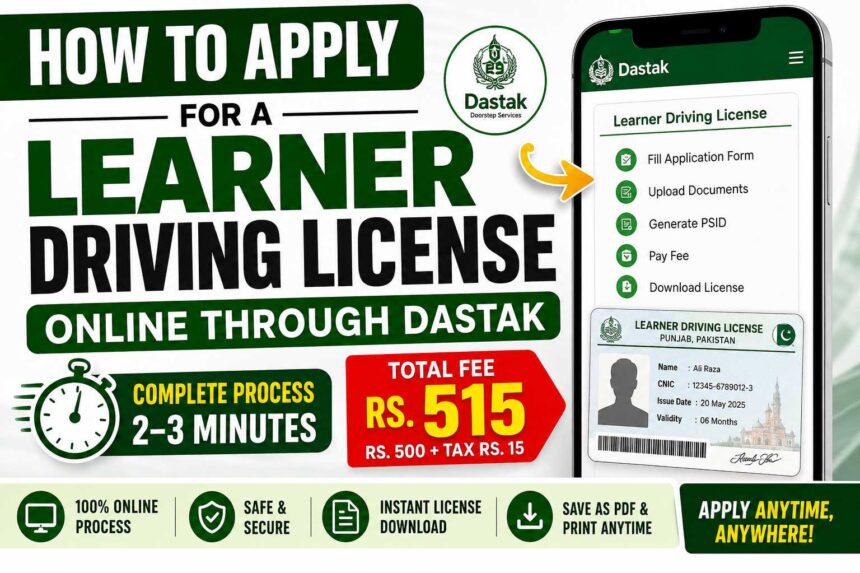
How to Apply for a Learner Driving License Online in Punjab Through Dastak
If you want to apply for a Learner Driving License online in Punjab, you can use the Dastak website or mobile app to start the application process without visiting a government office for the initial application.
The process generally involves creating a Dastak account, selecting the learner license service, entering your personal information, uploading the required documents, submitting the application, generating a PSID/challan and completing the required payment.
Quick answer: To apply online, create a Dastak account, log in, select the Learner Driving License service, complete the application form, upload the required documents, submit the application, pay the generated PSID/challan and then use the tracking option to check the application and download the license when it becomes available.
Dastak Learner Driving License: Quick Overview
| Requirement | Details |
|---|---|
| Service | Learner Driving License |
| Platform | Dastak Website / Dastak App |
| Minimum age | 18 years |
| Application | Online |
| Payment | PSID/challan and supported payment methods |
| Documents | CNIC and photograph, subject to current portal requirements |
| License delivery | Digital/downloadable copy when issued |
Important: Fees, required documents, service availability and processing procedures can change. Always verify the amount shown on the official Dastak portal before making payment.
Dastak Website for Learner Driving License
You can start the process through the official Dastak citizen portal.
Dastak Registration:
https://dastak.punjab.gov.pk/citizen/showSignupForm
The Dastak mobile application is also available on Google Play. The current official listing identifies the app as Dastak – Doorstep Services by Punjab Information Technology Board.
Dastak Android App:
https://play.google.com/store/apps/details?id=pk.pitb.gov.dastakHomeDelivery
Step 1: Create a Dastak Account
First, create an account on the Dastak citizen portal.
You may be asked to provide information such as:
- CNIC number
- Mobile number
- Email address
- Password
- Other registration information requested by the portal
Make sure the information you enter matches your official documents.
Step 2: Log In to Your Dastak Account
After registration, log in using the credentials associated with your Dastak account.
If the website does not work properly on your phone, you can also try the official Dastak mobile application.
Step 3: Select the Learner Driving License Service
After logging in, find the driving-license-related services and select the Learner Driving License option if it is available for your location/account.
Depending on the portal’s current interface, other driving-license services may also be displayed.
The Dastak platform provides access to multiple government services and supports several payment methods, including PSID-based payments.
Step 4: Complete the Learner License Application Form
Enter your information carefully.
The application may ask for details such as:
- Full name
- CNIC information
- Date of birth
- Address
- Vehicle/license category
- Emergency contact
- Other information required by the application
What is the minimum age for a learner driving license?
For the application described here, the minimum age requirement is 18 years. Always check the current official requirements before submitting your application.
Step 5: Upload the Required Documents
Upload clear photographs or scans of the documents requested by the portal.
These may include:
- CNIC front side
- CNIC back side
- Passport-size photograph
The exact document requirements can change, so follow the requirements displayed inside your Dastak application.
Photograph Background
If your photograph needs a plain or different background, you can use an image-editing service such as remove.bg:
Do not upload edited information or documents that misrepresent your identity. Only modify the photograph in a way permitted by the application requirements.
Step 6: Review and Submit Your Application
Before submitting, carefully check:
- CNIC number
- Name
- Date of birth
- Address
- Vehicle category
- Mobile number
- Uploaded documents
- Photograph
Incorrect information can cause delays or problems with your application.
Once everything is correct, submit the application.
Step 7: Generate the PSID or Challan
After submission, the system may generate a PSID/challan number for payment.
Save the number because you may need it to complete the payment and track your application.
Step 8: Pay the Learner License Fee
Use one of the payment methods supported by the current Dastak/payment system.
The Dastak app listing currently mentions payment options including IBFT, JazzCash, Easypaisa, COD and PSID.
JazzCash
Open the JazzCash application and look for the relevant government-payment option.
Enter your learner-license challan/PSID number, check that the displayed information is correct and complete the payment.
Easypaisa
Open Easypaisa and go to the government-fee/payment section.
Enter your challan/PSID number, verify the displayed details and complete the payment.
Banks and ATMs
Other payment channels may also be available depending on the current payment system.
Always verify the final amount displayed against your PSID/challan before paying.
What is the Learner Driving License fee?
The payable amount should be confirmed from the current Dastak application or generated challan rather than relying on an old social-media post or fixed amount.
Step 9: Track Your Application and Download the License
After successful payment and processing, check your application through the Dastak tracking facility.
A typical process is:
- Open the Dastak website or app.
- Select Track Application.
- Enter your CNIC or requested tracking information.
- Check your application status.
- Download the learner license when it becomes available.
Keep a digital copy on your phone and print it if you need a physical copy.
Dastak Track Application Not Working? Try This
Sometimes an online government service may display an error or fail to show the application correctly.
If your application has already been submitted and payment has been completed:
- Confirm that your payment was successful.
- Keep your PSID/challan/payment information.
- Try tracking the application again later.
- Try the Dastak mobile app if the website is not displaying the application correctly.
- Check that you are using the correct CNIC/tracking information.
- Contact official Dastak support if the problem continues.
Do not make a second payment simply because the application is temporarily not appearing. First verify the payment status and existing application.
What Happens After Getting a Learner Driving License?
Obtaining a learner license is not the same as receiving a regular driving license.
After obtaining the learner license, you may need to complete the required waiting period and then take the applicable driving test according to the current Punjab licensing rules.
If you pass the required test, you can proceed with the regular driving-license process.
The regular driving-license fee is separate from the learner-license application. The current Dastak fee structure lists different regular-license charges according to vehicle category and validity period.
Frequently Asked Questions
Can I apply for a learner driving license online in Punjab?
Yes. Dastak provides an online platform through which eligible citizens can access government services. The exact learner-license availability and application steps should be checked in the current Dastak portal/app.
What documents are required for a learner driving license?
The application can require identification and a photograph, such as CNIC front and back and a passport-size photograph. Always follow the document list displayed by the current application.
What is the minimum age for a learner driving license?
The minimum age for the application described in this guide is 18 years.
Can I pay the Dastak challan through JazzCash?
Payment methods can include JazzCash and other supported channels. The current Dastak app listing specifically mentions JazzCash, Easypaisa, IBFT, COD and PSID among its payment options.
Can I use the Dastak app instead of the website?
Yes. Dastak has an official mobile application for government services. The current Google Play listing identifies it as Dastak – Doorstep Services by Punjab Information Technology Board.
How can I download my learner driving license?
After the application has been processed and the license becomes available, use the Dastak tracking facility and follow the download option shown for your application.
What should I do if my Dastak application is not showing?
First verify your payment and application details. Then try the Dastak app, retry the tracking facility and contact official support if the problem continues.
Is the learner license fee the same as the regular driving-license fee?
No. The learner-license application and regular driving-license process have separate requirements and fees. The official Dastak fee structure lists separate regular-license charges.
Important Tips Before Applying
- Use your own correct personal information.
- Make sure your CNIC information is accurate.
- Upload clear documents.
- Check the vehicle category carefully.
- Save your application/PSID number.
- Verify the payment amount before paying.
- Keep your payment receipt.
- Do not pay unofficial agents unless you deliberately choose an authorized service.
- Check the official portal for the latest requirements and fees.
- If the website has an error, try the official app or contact Dastak support.
Official Dastak Resources
Dastak Citizen Portal:
https://dastak.punjab.gov.pk/
Dastak Registration:
https://dastak.punjab.gov.pk/citizen/showSignupForm
Dastak Android App:
https://play.google.com/store/apps/details?id=pk.pitb.gov.dastakHomeDelivery
Dastak Fee Structure:
https://dastak.punjab.gov.pk/citizen/fee/stucture
The Dastak Android app is published by the Punjab Information Technology Board (PITB), and its current listing describes Dastak as a government-services platform.
Final Takeaway
Applying for a Learner Driving License online through Dastak can save you a trip to a government office for the initial online application. The general process is:
Create Account → Log In → Select Learner License → Complete Form → Upload Documents → Submit → Generate PSID → Pay Fee → Track Application → Download License
Because government fees, service availability and application requirements can change, always use the amount and requirements displayed by the official Dastak system at the time you apply.