
HIPAA Compliant Form Builder Free: Real Solutions vs. Free-Tier Traps
For small therapy practices, solo dental clinics, and telehealth startups, digital patient intake forms are indispensable. However, searching for a “free HIPAA compliant form builder” often leads straight into vendor paywalls.
Most commercial form builders claim to offer “free plans,” only to conceal their mandatory Business Associate Agreement (BAA) behind $50 to $200 monthly enterprise tiers. Here is the legal reality of free HIPAA forms, how to secure genuine compliance without recurring software overhead, and an interactive compliance risk calculator.
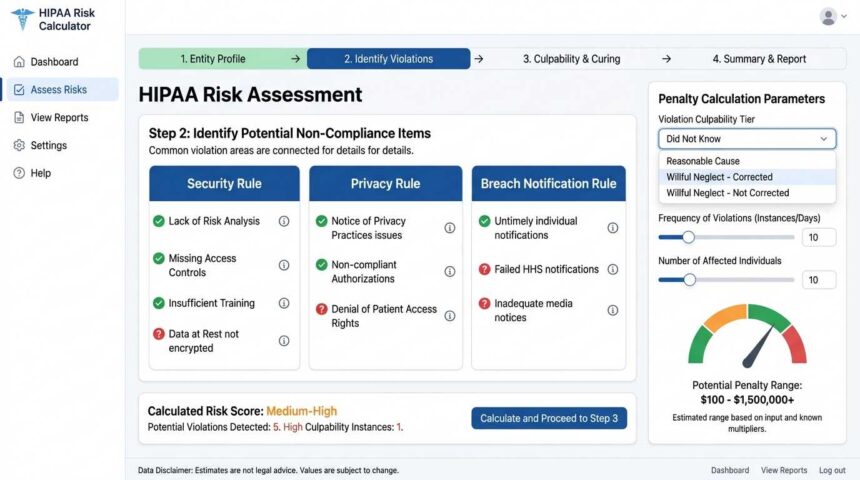
HIPAA Non-Compliance Exposure & Cost Calculator
Estimate potential statutory civil liability tiers under the HHS Office for Civil Rights (OCR) for handling unencrypted or un-agreed intake forms.
*Calculations reflect statutory civil monetary penalty ranges indexed for inflation by the U.S. Department of Health and Human Services (HHS).
The Business Associate Agreement (BAA) Trap
In web security, a form can have 256-bit SSL encryption, database hashing, and modern firewalls, yet still be completely illegal for patient intake under U.S. federal law.
Popular web builders like Typeform, Jotform, and Formstack frequently market “free plans” for testing, but their systems explicitly restrict BAA execution to custom Enterprise or Gold tiers starting at $40 to $300 per month.
3 Genuinely Free (or Near-Free) HIPAA Compliant Form Pathways
Option 1: Self-Hosted Open-Source (Formbricks or HeyForm)
100% Free SoftwareBy deploying open-source form software on your own private cloud infrastructure, you bypass third-party software licensing fees entirely.
- How It Works: Host Formbricks via Docker on an AWS EC2 or Google Cloud instance.
- Why It’s Compliant: Both AWS and Google Cloud execute free BAAs with account holders. Because you own the server, no external software vendor touches the PHI.
- Ongoing Cost: $0 software license; ~$5 to $10/month for cloud server hosting.
Option 2: Google Forms via Existing Google Workspace
Included with WorkspaceIf your practice already utilizes paid Google Workspace (even the entry-level $6/user Business Starter plan), you do not need to purchase an expensive third-party form builder.
- How It Works: Navigate to your Workspace Admin Console and execute the Google Workspace HIPAA BAA (provided at no additional cost).
- Why It’s Compliant: Once signed, Google Forms, Sheets, and Drive operate under the BAA umbrella.
- Best Practice: Disable email notifications containing raw form responses, as standard email transmission is not end-to-end encrypted.
Option 3: Specialized Freemium Clinical Platforms (PlatoForms, Medesk)
Zero-Cost Starter TiersA limited number of healthcare-specific form engines allow solo practitioners to sign a BAA on a restricted free tier (typically capped at 10–20 submissions per month).
- Trade-Off: Strict monthly submission volume caps and watermarked branding on exported PDFs.
- Best For: Independent therapists or niche clinicians managing under 5 new patient intakes per week.
Form Builder Platform & BAA Availability Comparison
| Platform | Free Tier Available? | BAA on Free Tier? | Minimum Plan for BAA | Compliance Verdict |
|---|---|---|---|---|
| Google Forms (Free @gmail) | Yes | No | Google Workspace ($6/mo) | Illegal for PHI |
| Jotform | Yes (5 forms) | No | Gold Tier ($99/mo) | Illegal on Free Plan |
| Typeform | Yes | No | Enterprise Tier (Custom Quote) | Illegal on Free Plan |
| Self-Hosted Formbricks | Yes (Open Source) | Yes (Self-Governed + Cloud BAA) | $0 License (Self-Hosted) | 100% Compliant |
| Google Workspace Forms | No (Requires $6 account) | Yes (Included free) | Business Starter ($6/mo) | 100% Compliant |
Technical Checklist: Hardening Your Digital Intake Forms
Securing a BAA is step one. To complete technical compliance under the HIPAA Security Rule, enforce these configurations:
- Never Transmit PHI via Email Notifications: When a user submits an intake form, ensure the email alert says “New submission received – log in to view” rather than dumping health details into plaintext email notifications.
- Enforce End-to-End Encryption in Transit & At Rest: Forms must run strictly over TLS 1.3 in transit and store database payloads with AES-256 bit encryption at rest.
- Activate Immutable Audit Trails: Keep historical logs detailing precisely who accessed, exported, or deleted individual patient form records, retaining logs for a minimum of 6 years.
- Mandate Multi-Factor Authentication (MFA): Every administrative user who accesses the form dashboard must authenticate via hardware keys (FIDO2) or authenticator apps.
Frequently Asked Questions
What constitutes Protected Health Information (PHI) on a form?
Any health-related or medical data paired with one of HIPAA’s 18 personal identifiers (such as patient full name, date of birth, phone number, email address, or Social Security number). Even an appointment booking form that collects a name and asks for a “reason for visit” is legally classified as PHI.
Can I use standard WordPress form plugins (WPForms, Gravity Forms) for free?
The free versions store form entries unencrypted in your standard WordPress MySQL database. Unless your web hosting provider signs a BAA and your database entries are encrypted at rest with strict audit trails, standard free plugins will expose your practice to civil penalties.
How do I verify if my signed BAA is legally binding?
A legally binding BAA must explicitly define permitted uses of PHI, require the associate to implement HIPAA Security Rule administrative and physical safeguards, mandate immediate breach reporting (within 60 days maximum), and ensure all subcontractors agree to the same restrictions.